
Notice: Some users are experiencing issues when logged into multiple Google accounts on the same web browser. If the Add-on does not load for you, please be sure that you are only logged in with the account that you used to install Doc Variables.
Basic Syntax
Variables use the format ${Variable Name}
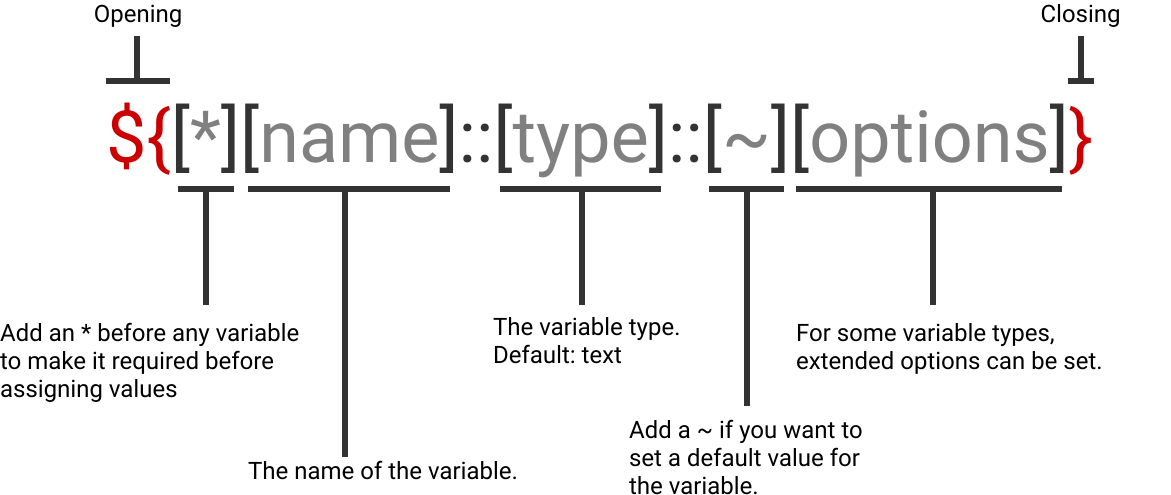
Field Types
Type: Text
The default variable type.
${Variable Name}
${*Required Variable}
${Variable Default::~Default Text}
Type: Transform
Text field which transforms the output to the selected option.
${Variable Name::transform::uppercase}
Options: uppercase, lowercase, capitalize
uppercase:
CUSTOMER
lowercase:
customer
capitalize:
Customer
Type: Text Area
Generates a text area field for variables that require more user input.
${Variable Name::textarea}
${Variable Name::textarea::~Default text}
Type: Date
Generates a calendar field to select specific dates.
${Variable Name::date}
${Variable Name::date::MM/DD/YYYY}
Formatting Options:
| Input | Example | Description |
|---|---|---|
| YYYY | 2014 | 4 digit year |
| YY | 14 | 2 digit year |
| M or MM | 1..12 | Month Number |
| MMM | Jan | Short Month Name |
| MMMM | January | Full Month Name |
| D or DD | 1..31 | Day of Month |
| ddd | Mon | Day of Week (short) |
Type: Options
Generates a dropdown list of options to select for values.
${Variable Name::options::Option 1, Option 2, Option 3}
${Variable Name::options::"Longer Text Option 1", "Longer Text Option 2"}
${Variable Name::options::Option 1,~Default Option, Option 3}
Type: Options-Values
Generates a dropdown list of options with name-value pairs to select for values.
${Variable Name::options-values::"Option 1":"Option 1 Value", "Option 2":"Option 2 Value"}